
Features

Six modules. One connected inventory workflow.

Start with POS integration and recipe-driven inventory, then add purchasing, analytics and multi-site control as your operation grows.

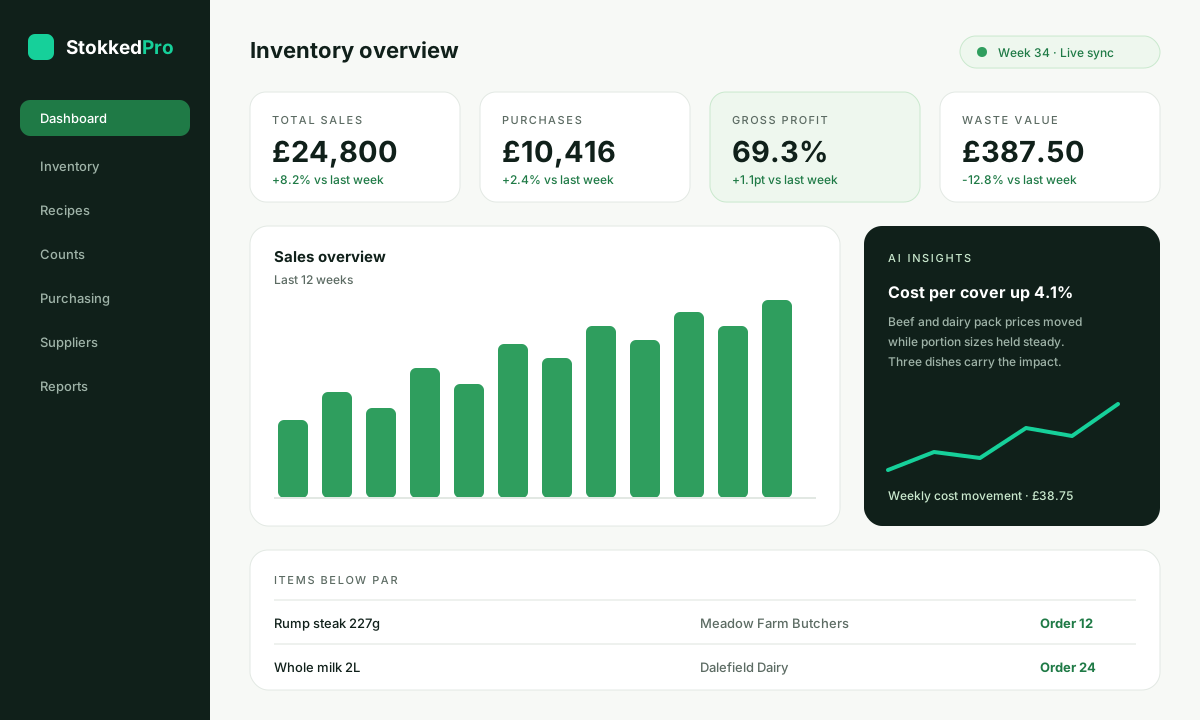
StokkedPro dashboard with total sales, total purchase, gross profit, waste value and sales overview charts
Dashboard — widgets you can drag, drop and tailor to each role.
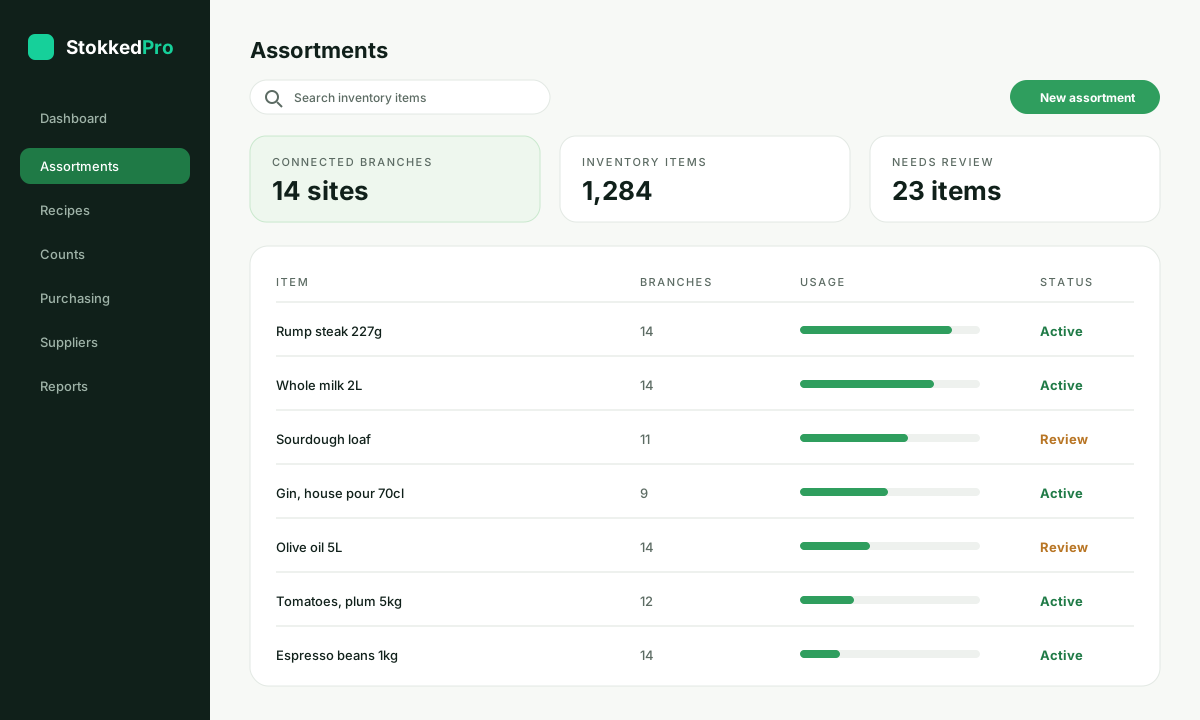
StokkedPro assortments list showing connected branches, inventory items and purchase item usage
Assortments — branch coverage, usage levels and items needing review.
The modules

Everything your stock week needs

Each module works on its own and gets better alongside the others. Most teams start with the first three and add the rest within a quarter.

01

POS integration

Two-way integration with your existing POS so sales flow into StokkedPro and product, price and recipe changes flow back. No exports, no re-keying.

  • Automated daily sales import
  • Product and PLU mapping
  • Modifier and bundle handling
  • Multi-till and multi-site feeds
02

Recipe management

Build dishes, cocktails, sub-recipes and prep items with accurate yields so every sale depletes the right ingredients at the right cost.

  • Nested sub-recipes and preps
  • Yield, waste and portion control
  • Live dish cost and GP%
  • Allergen and spec notes
03

Inventory management

Counts, transfers, wastage and par levels in one place, with theoretical versus actual usage reconciled so variance is visible early.

  • Mobile stock counts
  • Par levels and low-stock alerts
  • Wastage and transfer logging
  • Variance and shrinkage reporting
04

Purchasing & suppliers

Turn stock signals into orders. Supplier catalogues, price tracking and approvals sit in the same workflow as your inventory.

  • Suggested purchase orders
  • Supplier catalogues and price history
  • Order approval rules
  • Delivery and invoice matching
05

Analytics & reports

Operational reporting built for inventory teams — usage, cost movement, margin by item and site-by-site comparison.

  • Theoretical vs actual usage
  • COGS and margin tracking
  • Supplier price movement
  • Scheduled report delivery
06

Multi-site & multi-brand

Run several venues, brands or regions from one structure with shared master data and site-level control where it matters.

  • Central recipe and product library
  • Site and brand permissions
  • Group-level consolidated reporting
  • Inter-site transfers
See it on your own numbers

The clearest way to judge it is a live walkthrough

We will connect a sample of your sales and product data during the session and show the modules working against your menu, your suppliers and your sites.

Included as standard

The things every StokkedPro workspace comes with

Unlimited users

Add every chef, store manager and head-office user you need — there is no per-seat limit.

Mobile stock counting

Count on a phone or tablet in the walk-in, the cellar or the stockroom, online or offline.

Daily backups & secure hosting

Encrypted cloud infrastructure with role-based access, daily backups and audit trails.

Ongoing product updates

New features and integrations arrive in your workspace at no extra cost.

Hands-on support

Get live faster with our team alongside you

Implementation & setup

POS connection, product mapping, supplier and recipe build, plus operational rule configuration.

Recipe build service

Our team builds and costs your menu from your existing specs, including sub-recipes and yields.

Team training

Live training for chefs, bar managers, store teams and back-office staff, remote or on site.

Custom integration

Accounting, ERP, supplier EDI or bespoke POS connections built with our integrations team.

Tell us how many sites you run and which POS you use, and we will recommend the right setup on your demo call.

Good to know

Common questions about the modules

Do we have to use every module?

No. Most teams start with POS integration, recipe management and inventory management, then add purchasing, analytics and multi-site control once the first three are settled.

What counts as a site?

A site is one trading location — a restaurant, bar, hotel outlet or store — regardless of how many tills or users it has. Central kitchens and warehouses count as a site only if you hold and count stock there.

Can we add modules later?

Yes. Modules can be switched on whenever you are ready, and nothing needs rebuilding — your products, recipes and suppliers are already in place.

How do we see it working on our own data?

Book a demo and we will connect a sample of your sales and product data during the session, so you are looking at your own numbers rather than a generic sandbox.

Ready when you are

Not sure which modules you need?

Tell us how many sites you run and which POS you use — we'll map the right setup on a short demo call.